🡠 Back


Domains guide
Reading time
7 min
Domains
October 28, 2026
afrus.ai
Complete guide to Domains: every step with its screenshots and the frequently asked questions.
In this article
After reading this guide you will know what a custom domain is in AFRUS, what it does for you and how to set it up so your landings are published with your organization's address.
Module: Dominios (Domains) · Menu: Fundraising > Dominios · Audience: digital marketing, communications and IT teams
About the labels in this guide: buttons, fields and menus are written exactly as they appear in the Spanish version of the console, with an English explanation where it helps.
What Domains is
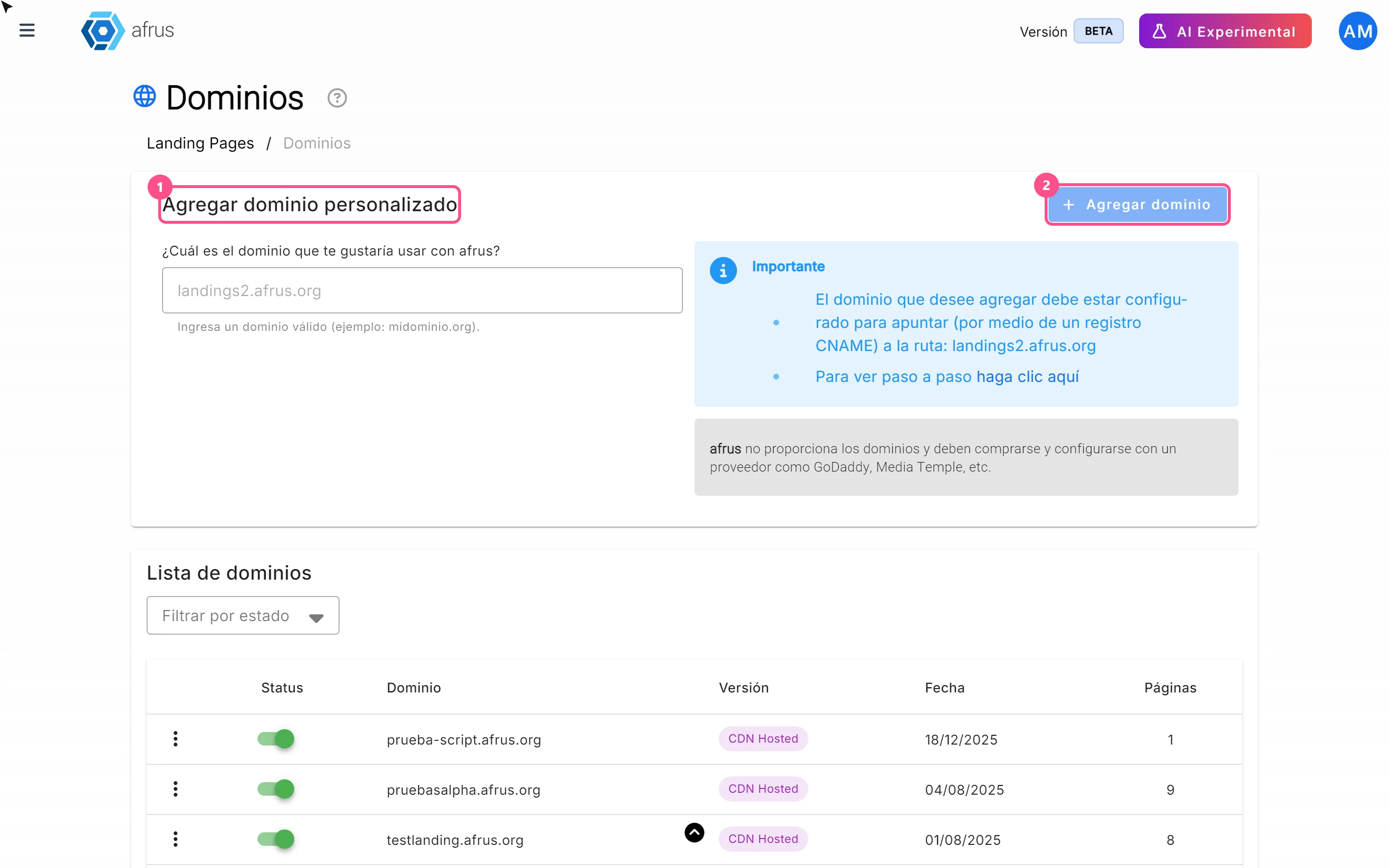
Dominios (Domains) is the screen where you register your organization's own domain or subdomain (for example donate.myorganization.org) so your landing pages are published with that address, instead of the default AFRUS address (web.afrus.org).
As the screen itself says: "Asocia un dominio propio para que tus landing pages se vean con la URL de tu organización, fortaleciendo tu marca y generando más confianza en tus campañas." ("Link your own domain so your landing pages show your organization's URL, strengthening your brand and building more trust in your campaigns.")
What it is for
- Publish your landings under your brand. Donors see your organization's web address, which builds more trust.
- Have several addresses of your own and choose which one each landing uses.
- Keep your domains under control: see how many landings use each one (Páginas column) and turn them on or off.
- Security without the paperwork. AFRUS manages the domain's security certificate (the padlock, HTTPS) automatically: you don't need to buy or install certificates.
Before you start
- Buy the domain from a provider. AFRUS doesn't sell domains: "afrus no proporciona los dominios y deben comprarse y configurarse con un proveedor como GoDaddy, Media Temple, etc." (AFRUS doesn't provide domains; buy and set them up with a provider such as GoDaddy, Media Temple, etc.)
- Have access to the domain's DNS settings, at your provider or through your IT team.
- Use a subdomain (for example
donate.myorganization.org). This is recommended: the screen only asks for a CNAME record, and many providers don't allow a CNAME on the main domain (myorganization.org).
Step by step
How to add and set up my domain in AFRUS
Part 1 — At your domain provider (outside AFRUS)
Create a CNAME record. In your domain's DNS settings, create this record, as the Importante (Important) box on the AFRUS screen shows:
Type Name / Host Value / Target CNAME the subdomain you want to use (for example donatefordonate.myorganization.org; depending on the provider you type justdonateor the full name)landings2.afrus.orgIf the value shown on the AFRUS screen is different, always use the one on the screen.
Wait for the change to propagate. DNS changes can take time; how long depends on your provider, not on AFRUS. It is best to create the record and wait before adding the domain in AFRUS.
Part 2 — In AFRUS
Open Domains. Go to Fundraising > Dominios.
Type your domain. In the Agregar dominio personalizado (Add custom domain) card, in the field under "¿Cuál es el dominio que te gustaría usar con afrus?" (Which domain would you like to use with afrus?), type your domain without
http://,https://, slashes or paths, for exampledonate.myorganization.org. The field turns everything into lowercase.Add it. Click "Agregar dominio" (Add domain), top right of the card; it becomes active when the text is valid.
When you finish you will see "Dominio registrado con exito" (Domain registered successfully), and your domain will appear in Lista de dominios (Domain list) with Status on (active) and Versión "CDN Hosted".
What happens next: AFRUS gets the domain ready and automatically requests its security certificate (HTTPS). It checks that the domain responds right away and then every 30 seconds, for about 15 minutes. There is no "Verify" button and you don't have to wait for our team to approve it.
- If the check succeeds, the domain is confirmed.
- If after those 15 minutes it doesn't succeed (usually because the DNS record is wrong or hasn't propagated yet), the domain becomes inactive on its own.
Important: the screen doesn't refresh by itself. To see the current status, reload it or change the filter. Until the certificate is issued, the domain shows as active and you can already choose it on a landing, but the
https://address doesn't open correctly yet.
Part 3 — Use it on your landings
- Assign it to a landing. When creating or editing a landing, in Datos básicos (Basic data), choose your domain in the Dominio selector. The landing is published at
https://<your-domain><path>. See the Landings guide.
Important: adding the domain doesn't publish anything by itself. If no landing uses it, your content won't show when you open it.
Messages you may see
| Message | What it means | What to do |
|---|---|---|
| "Dominio existente, prueba otro" (Domain already exists, try another) | That domain is already registered in AFRUS. Each domain can only be registered once across the whole platform. | Check your Lista de dominios or use another subdomain. |
| "El dominio no se encuentra apuntando al Host (landings2.afrus.org)" (The domain doesn't point to the host) | AFRUS checked the DNS and the domain doesn't point to AFRUS yet. | Check the CNAME record and wait for it to propagate. |
| "Error al registrar dominio" (Error registering domain) | Another error. | Try again; if it persists, contact support. |
| "El dominio no puede contener espacios", "El dominio solo puede contener letras, números, puntos y guiones", "El formato del dominio no es válido (ejemplo: dominio.com)", "El dominio debe tener entre 3 y 253 caracteres" | The text in the field isn't valid (spaces, invalid characters, wrong format or length). | Correct the domain. |
Other tasks
How to turn a domain on or off
In Lista de dominios, use the switch in the Status column. You will see "Dominio actualizado con exito" (Domain updated successfully). An inactive domain is no longer offered in the landings' Dominio selector.
How to delete a domain
- Open the row menu. In Lista de dominios, open the domain's three-dot menu and choose Eliminar (Delete).
- Confirm. In the Confirmar eliminación (Confirm deletion) dialog, click "Confirmar".
You will see "Dominio eliminado con exito" (Domain deleted successfully). Keep in mind:
- Although the warning says "las landings asociadas se borrarán" (the associated landings will be deleted), they are not deleted: they are left without a domain and deactivated. To keep using them, reactivate them and assign another domain (or the AFRUS one).
- AFRUS stops serving the domain. The DNS record at your provider isn't touched: you can delete it yourself.
- The domain becomes free to be registered again.
Can it be undone? Not from the screen. You can register the domain again and reassign it to your landings.
List columns and statuses
| Column | What it shows |
|---|---|
| Status | Switch: on = active, off = inactive. Locked while the domain is pending deletion. |
| Dominio | The registered name. |
| Versión | "CDN Hosted" (registered with the current system; the only ones you can choose on landings) or "Classic" (domains from the previous system). |
| Fecha | Registration date, or "Sin fecha" (No date). |
| Páginas | How many landings use that domain. |
| Situation | Shows as |
|---|---|
| Security certificate confirmed | Active |
| Just registered, check in progress | Active |
| Turned off by you, or the check failed after about 15 minutes | Inactive |
| Pending deletion | Inactive, with the switch locked |
Use Filtrar por estado (Filter by status: Todos / Activos / Inactivos) to find your domains.
Frequently asked questions
Does AFRUS sell me the domain?
No. You buy it from a provider (GoDaddy, Media Temple or another) and set it up there.
Do I need to buy a security certificate?
No. AFRUS manages it automatically.
Can I use my main domain, without a subdomain?
The screen accepts it, but it only shows a CNAME record, which many providers don't allow on the main domain. We recommend using a subdomain.
How long until it's ready?
It depends on how long your provider takes to propagate the DNS. Once added, AFRUS checks the domain for about 15 minutes.
My domain became inactive. What do I do?
Usually the CNAME record is wrong or hasn't propagated yet. Check it with your provider. If the record is correct and the domain is still inactive, contact support: turning the switch back on doesn't repeat the check.
Can I use my domain as a home page?
Yes. On the landing, use the path / with your domain.
Last updated: 2026-10-27
Need help? Talk to the afrus team
In this article
✕
Related Tutorials

Domains
October 27, 2026
What Domains is in AFRUS
Learn what the Domains module is: where you register your organization's own domain to publish your landings with your address.
afrus.ai
Domains
October 27, 2026
What custom domains are for
Learn why to register your domain in AFRUS: landings under your brand, more trust and an automatic security certificate.
afrus.ai
Domains
October 27, 2026
How to add and set up my domain in AFRUS
Learn how to create the CNAME record at your provider, add your domain in AFRUS and use it on your landings.
afrus.ai