🡠 Back


How to create and use an autoresponder
Reading time
2 min
Autoresponders
October 27, 2026
afrus.ai
Learn how to create an autoresponder step by step: where it applies, when it's sent, how to design it and how to publish it.
In this article
Before you start
- A sending address. You can always use AFRUS's. To send from your organization's address, your domain must be verified first (card above the list).
Step by step
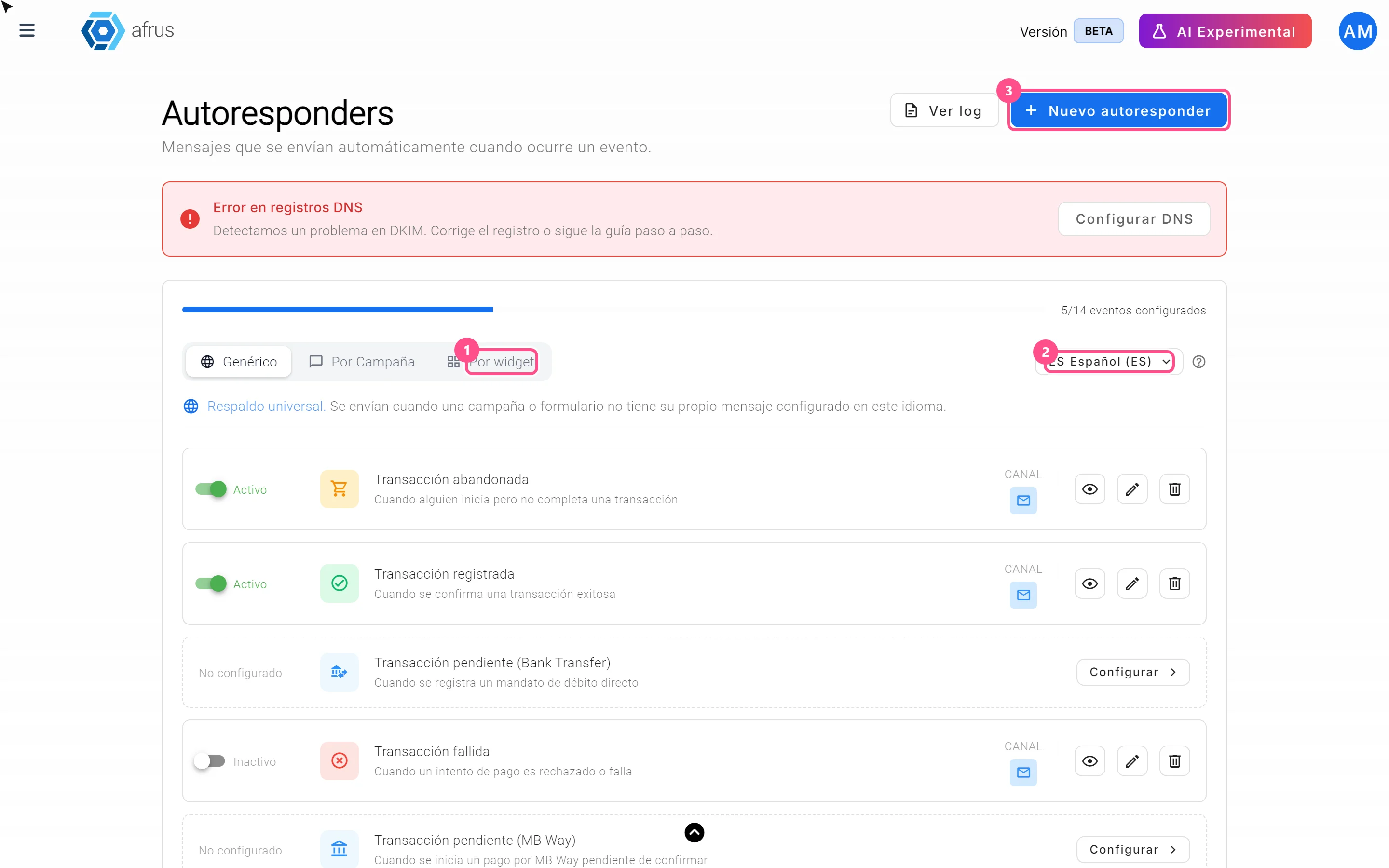
- Open autoresponders. Go to Interacciones > Autoresponders.
- Choose the language above the list.
- Start a new one. Click "Nuevo autoresponder" (New autoresponder).
- Choose where it applies. In Contexto (Context): Genérico (Generic), Por campaña (By campaign) or Por formulario (By form).
- Choose the moment. In Evento (Event), for example Transacción registrada (Transaction registered).
- Choose Manual mode and click "Confirmar e ir al editor" (Confirm and go to the editor).
- Fill in the details. Correo de envío (Sending email), Asunto del correo (Subject) and, if you want, an Archivo adjunto (Attachment). Click "Siguiente" (Next).
- Design the email. Choose Diseño en blanco (Blank), Galería de diseños (Gallery), Autoresponders (copy a previous one) or Editor con código (Code editor).
- Publish and save. Turn on Publicado (Published) and click "Guardar" (Save).
When you finish, it shows as Activo (Active) in the list.
Frequently asked questions
Can I pause it?
Yes, turn off the switch on its row. It becomes Inactivo.
Can it be undone if I delete it?
No. Deleting removes it instantly, without confirmation. If you only want to pause it, turn it off.
Can I make it with AI?
Yes: in the Genérico tab, on a No configurado event, click "Configurar" and choose Con IA. Fill in the URL call to action: if you leave it empty, the list keeps showing No configurado.
Do I need anything to make it with AI?
Yes, your user must have a signature created in AI > Firmas de usuarios. Without a signature you can't set up AI autoresponders.
Need help? Talk to the afrus team
In this article
✕
Related Tutorials
Autoresponders
October 27, 2026
What an autoresponder is
Learn what an autoresponder is: the email AFRUS sends on its own to a person when something happens, such as a donation.
afrus.ai
Autoresponders
October 27, 2026
What autoresponders are for
Learn what autoresponders are for: thanking every donation, flagging failed payments and talking to each person in their language.
afrus.ai
Autoresponders
October 27, 2026
Autoresponders for a form in several languages
Learn what to keep in mind with autoresponders if your donation form receives people in several languages.
afrus.ai
Autoresponders
October 27, 2026
Generic, campaign or form autoresponder
Learn when to create a generic autoresponder, one per campaign or one per form, and which one AFRUS sends.
afrus.ai