🡠 Back


How to read the Monitor de interacciones
Reading time
2 min
Trackers
October 27, 2026
afrus.ai
Learn how to read your account status, your bounce and complaint rates, and which send is raising them.
In this article
Step by step
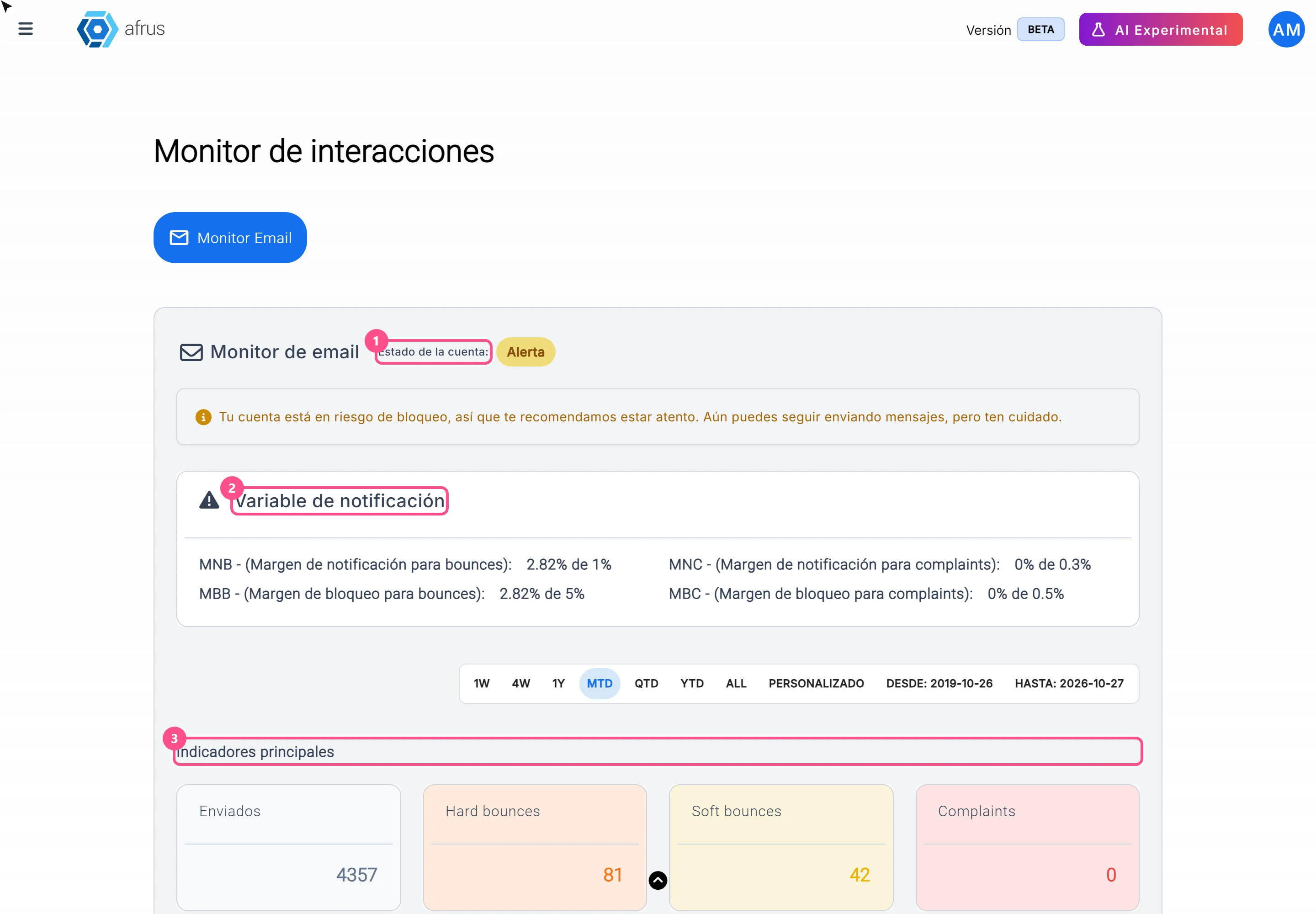
- Open the monitor. Go to Trackers > Monitor de interacciones; the Monitor Email tab opens.
- Look at the Estado de la cuenta (Account status). Activa (Active): you can send. Alerta (Alert): you can send, but you're at risk of being blocked; clean your lists. Bloqueada (Blocked): you can't send; write to support@afrus.app. Envío limitado (Limited sending): AFRUS enabled a number of sends for you; a campaign with more recipients than that won't be sent.
- Compare your rates. In Variable de notificación, MNB and MBB show your bounce rate against the alert and blocking limits; MNC and MBC, your complaint rate. Limits apply from 1,000 sends.
- Check the indicators. Enviados (Sent), Hard bounces, Soft bounces and Complaints count your whole history.
- Find the problem send. In Lista de blast, look at Bounce Rate (%) and Complaint Rate (%): green is fine, yellow is alert and red is blocking level. Click the ID to see the detail.
Frequently asked questions
Does the date bar change everything?
No. It only changes the Lista de blast; the status and indicators always use your whole history.
If AFRUS blocked my account, does it unblock by itself?
No. Even if your numbers improve, you need to write to support.
Need help? Talk to the afrus team
In this article
✕
Related Tutorials
Trackers
October 27, 2026
What Logs de interacciones is
Learn what Logs de interacciones is: the history of every email and WhatsApp message AFRUS prepared for a person.
afrus.ai

Trackers
October 27, 2026
What Procesos en ejecucion is
Learn what Procesos en ejecucion is: the list of actions you ran on many people at once, with their progress.
afrus.ai
Trackers
October 27, 2026
What the Monitor de interacciones is
Learn what the Monitor de interacciones is: the dashboard showing your mass emails' health and your sending account status.
afrus.ai
Trackers
October 27, 2026
How to read Procesos en ejecucion
Learn how to read the information in Procesos en ejecucion and what to do if a bulk action doesn't finish.
afrus.ai