🡠 Back


Plantillas AFRUS guide
Reading time
3 min
AFRUS Templates
October 28, 2026
afrus.ai
Complete guide to Plantillas AFRUS: every step with its screenshots and the frequently asked questions.
In this article
With this guide you will be able to find ready-made designs for your emails and pages, create your own templates and tell which ones are yours and which come with AFRUS.
Module: Plantillas AFRUS (AFRUS templates) · Menu: Interacciones > Plantillas AFRUS · Audience: communications and design teams
About the labels in this guide: buttons, fields and menus are written exactly as they appear in the Spanish version of the console, with an English explanation where it helps.
What Plantillas AFRUS are
Plantillas AFRUS is a library of ready-to-use designs: emails, pages (landings), attachments and certificates.
Some come with AFRUS and are available to every organization. Others are the ones your team creates for your organization.
What they are for
- Save time. Start from a finished design instead of from scratch.
- Keep your look. Save your organization's designs and use them again and again.
- Use them in many places. You find them when creating a mass send (Blast), an autoresponder, a workflow or a landing.
Step by step
What types of templates there are
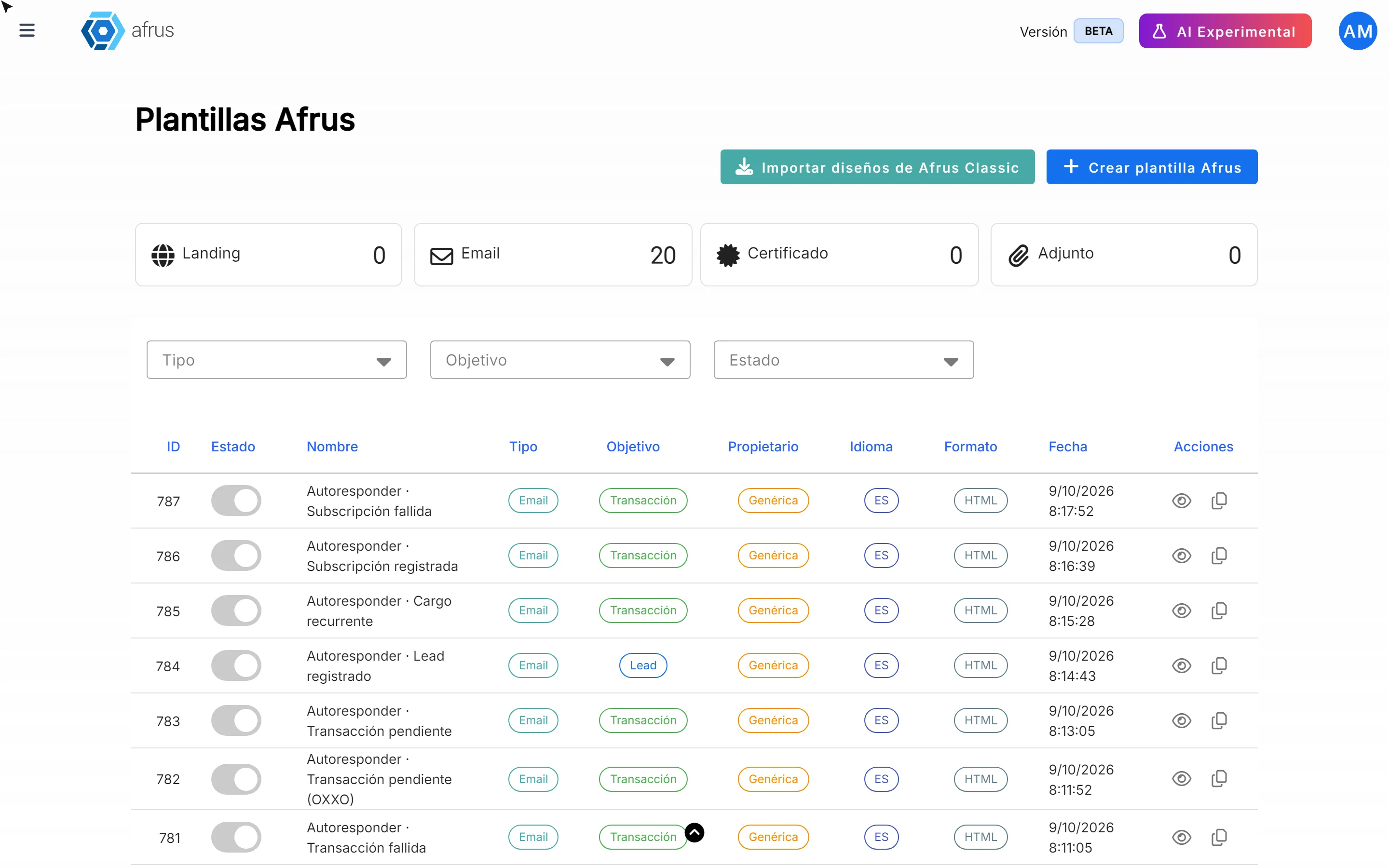
When you open Interacciones > Plantillas AFRUS you will see a table with all your templates.
By type:
| Type | What it's for |
|---|---|
| Emails: mass sends, autoresponders and workflows | |
| Landing | Donation or campaign pages |
| Adjunto (Attachment) | Files attached to an email |
| Certificado (Certificate) | Certificates sent to donors |
By goal: Transacción (Transaction, for donations), Lead (for contact sign-ups) and Agradecimiento (Thank-you).
You can filter the table by type, goal and status to find what you need.
How to create a new template
Open templates. Go to Interacciones > Plantillas AFRUS and click "Crear plantilla AFRUS" (Create AFRUS template).
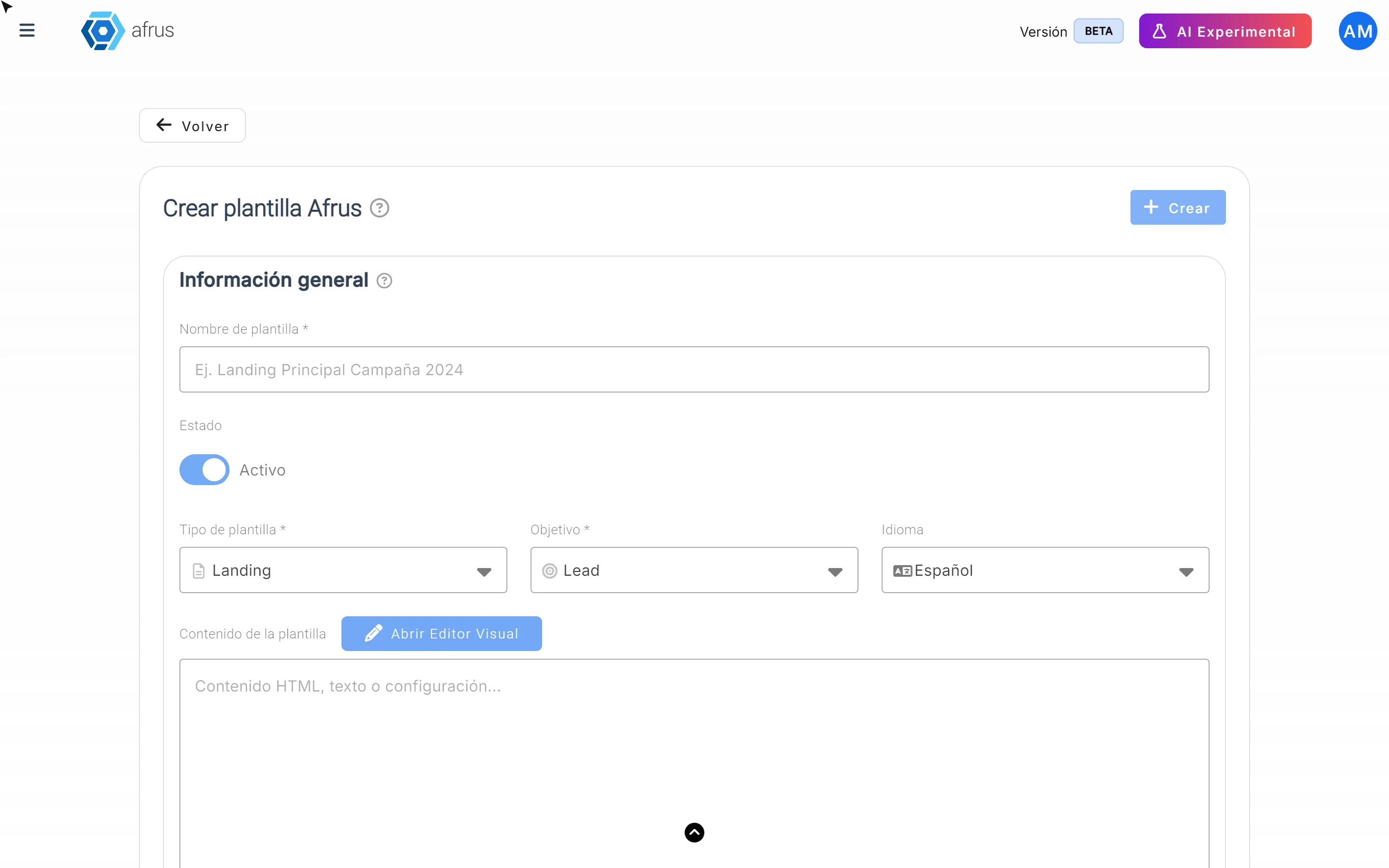
Fill in the general information.
- Nombre de plantilla (Template name, required): a name your team will recognize.
- Estado (Status): Activo (Active) or Inactivo (Inactive).
- Tipo de plantilla (Template type): email, landing, attachment or certificate.
- Objetivo (Goal): what you'll use it for.
- Idioma (Language): Spanish, English, Portuguese or German.
Design the content. In Contenido de la plantilla (Template content), click "Abrir Editor Visual" (Open visual editor) to design it without code. If you have the design in HTML, you can also paste it there.
Save. Click "Crear" (Create). You will see "Plantilla AFRUS creada exitosamente" (AFRUS template created successfully).
Do you have designs in the previous version of AFRUS? With "Importar diseños de AFRUS Classic" (Import designs from AFRUS Classic) you can bring them into the creation form.
To edit one of your templates: on its row, use "Editar plantilla" (Edit template), make the changes and click "Guardar cambios" (Save changes).
Can it be undone? Deleting a template ("Eliminar plantilla") removes it from your library.
How to tell your templates from the ones AFRUS provides
Look at the Propietario (Owner) column:
- Organización (Organization): your team created it. You can edit it, turn it on or off and delete it.
- Genérica (Generic): it comes with AFRUS and is shared by every organization. It can't be edited or deleted.
Want to change a generic template? Use "Duplicar plantilla en mi organización" (Duplicate template in my organization). This creates a copy that's yours (Organización), and that one you can edit.
How to use a template
- In a Blast: in the content step, go to Galería de plantillas (Template gallery) and click "Usar Plantilla" (Use template). Then you can adjust it in the editor.
- In an autoresponder: in the Diseño (Design) step, choose Galería de diseños (Design gallery).
- In workflows and landings: templates of the matching type also appear.
Email galleries show Email templates: the generic ones and your organization's.
Keep in mind
- Marking a template as Inactivo doesn't hide it from the Blast and autoresponder galleries yet. For now there's no other way to hide it: if you don't want your team to use it, the only option is to delete it.
- Generic templates can't be edited: always duplicate them first.
Frequently asked questions
Can I edit an AFRUS template?
Not directly. Duplicate it in your organization and edit the copy.
Can other organizations see my templates?
No. Organización templates are yours only. Genérica templates are the ones AFRUS shares with everyone.
Last updated: 2026-10-27
Need help? Talk to the afrus team
In this article
✕
Related Tutorials
AFRUS Templates
October 27, 2026
Types of Plantillas AFRUS
Get to know the types of Plantillas AFRUS (email, landing, attachment and certificate) and their goals.
afrus.ai
AFRUS Templates
October 27, 2026
How to tell your templates from AFRUS's
Learn how to recognize which templates your team created and which come with AFRUS, and how to edit an AFRUS template.
afrus.ai
AFRUS Templates
October 28, 2026
How to create a new AFRUS template
Learn how to create your own email, landing, attachment or certificate template in AFRUS, step by step.
afrus.ai