🡠 Back


Pasarela AFRUS guide
Reading time
5 min
Pasarela AFRUS
October 28, 2026
afrus.ai
Complete guide to Pasarela AFRUS: every step with its screenshots and the frequently asked questions.
In this article
This guide helps you understand how much of your donation money AFRUS transfers to you, when it transfers it, and what is deducted from each transfer.
Module: Pasarela AFRUS · Menu: Pasarela AFRUS (profile menu, top corner) · Audience: finance, accounting and leadership teams
About the labels in this guide: buttons, fields and menus are written as they appear in the Spanish version of the console, with an English explanation where it helps.
Don't see this option in your menu? It only appears for organizations that receive their donations through AFRUS's payment gateway. If you think you should see it, write to us.
What Pasarela AFRUS is
Pasarela AFRUS (AFRUS gateway) is the section where you see every transfer AFRUS makes to your organization with your donation money. We call each of these transfers a dispersión (payout).
When a donor gives to you by card or another payment method through the AFRUS gateway, the money first reaches AFRUS. AFRUS then transfers it to your bank account, after deducting the gateway fee and the bank's costs. In this section you see the detail of each transfer.
Important: this section has nothing to do with what your organization pays AFRUS for using the platform (forms, emails, users, etc.). That is a separate charge and is not deducted from your payouts.
What it is for
- Know how much you received and when. You see each transfer to your account, with its date.
- Understand the deductions. You see exactly how much was raised, how much was deducted and why.
- Reconcile your accounting. You can review the donations included in each transfer and download the detail.
- Answer your team's questions. You have at hand the data your accounting team or auditor asks for.
Step by step
How Pasarela AFRUS is set up
You don't have to set anything up. The section appears on its own when your organization receives its donations through AFRUS's payment gateway. From then on, every transfer we make to you is recorded here.
To start using it:
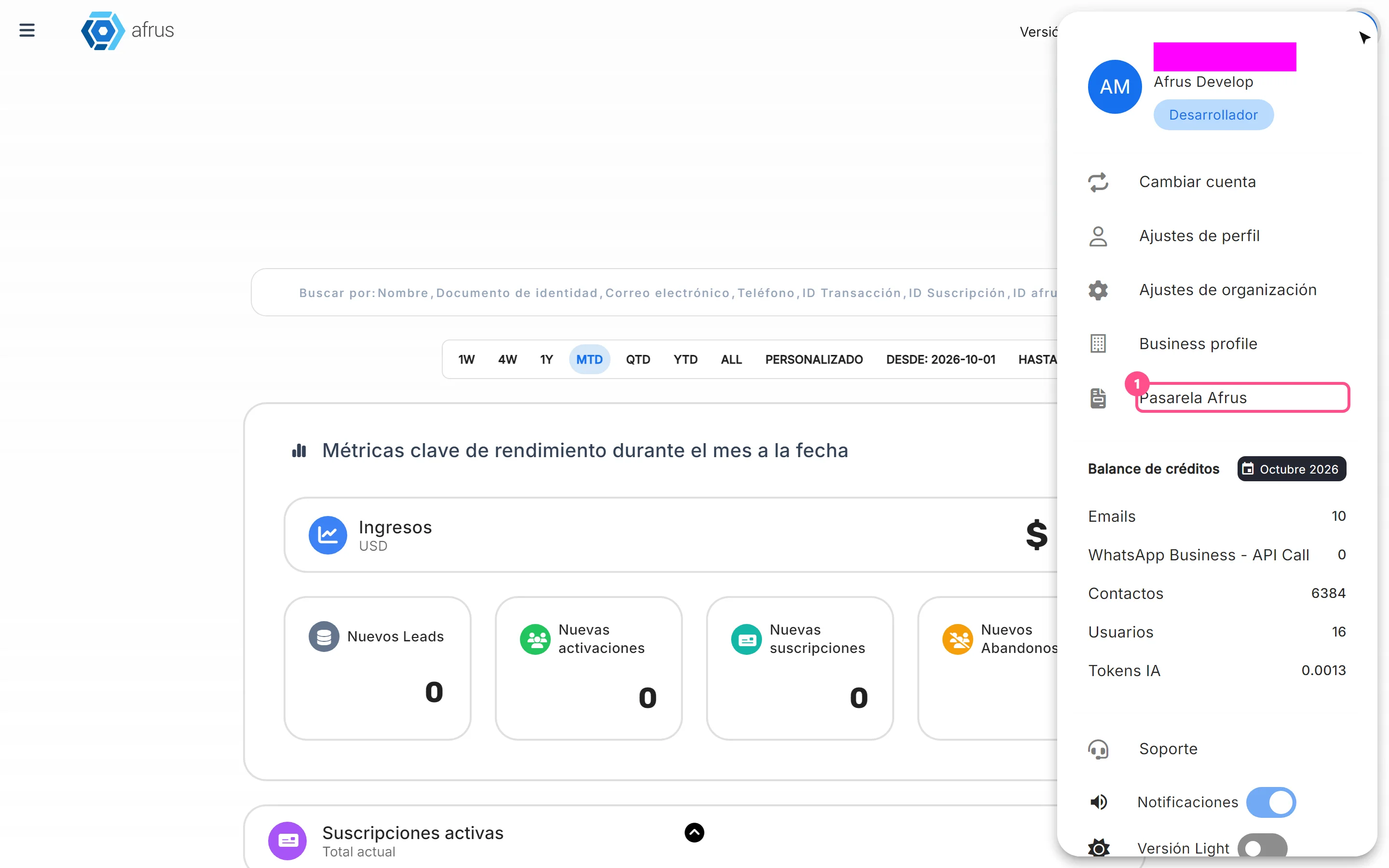
Open the section. In the profile menu (top corner), choose Pasarela AFRUS.
Review your transfers. Historial de Pasarela AFRUS (Pasarela AFRUS history) opens. At the top you see three summaries: Última dispersión (Last payout), Monto de la última dispersión (Amount of the last payout) and Veces dispersado (Times paid out, how many transfers you have received). Below is the list of your payouts, with the columns Fecha de corte (Cut-off date), Fecha de dispersión (Payout date), Transacciones (Transactions) and Total recaudado (Total raised).

Filter by dates (optional). In Filtrar por (Filter by), choose Fecha de dispersión or Fecha de corte, and pick the start and end dates. This way you quickly find a transfer.
Tip: "Ver transacciones fraudulentas" (See fraudulent transactions), at the top right of the list, opens the Transacciones Fraudulentas (Fraudulent transactions) screen, where you see the transactions marked as fraud.
Payouts are usually made in the first 5 days of each month.
How to read a payout
In the Historial de Pasarela AFRUS list, each payout shows Fecha de corte, Fecha de dispersión, Transacciones and Total recaudado. Each payout also has its deductions. This is all the data:
| Item | What it means |
|---|---|
| Fecha de corte (Cut-off date) | Up to which day donations were included in this transfer. For example, if the payout is on September 20, the cut-off date may be the 19th: donations up to that day are included |
| Fecha de dispersión (Payout date) | The day AFRUS transferred the money to your account |
| Transacciones (Transactions) | The donations included in that transfer |
| Total recaudado (Total raised) | Everything your donors gave in that period, before any deduction |
| Comisión pasarela (Gateway fee) | What the AFRUS gateway charges to process the payments: a percentage plus a fixed amount per donation, plus VAT. The rate depends on your contract |
| Retención ICA and Retención en la fuente (bank withholdings) | Deductions the bank makes when the donor pays by card. They are not AFRUS charges |
| Transfer cost | The fixed cost of sending the money to your bank account |
| Amount transferred | What finally reached your account |
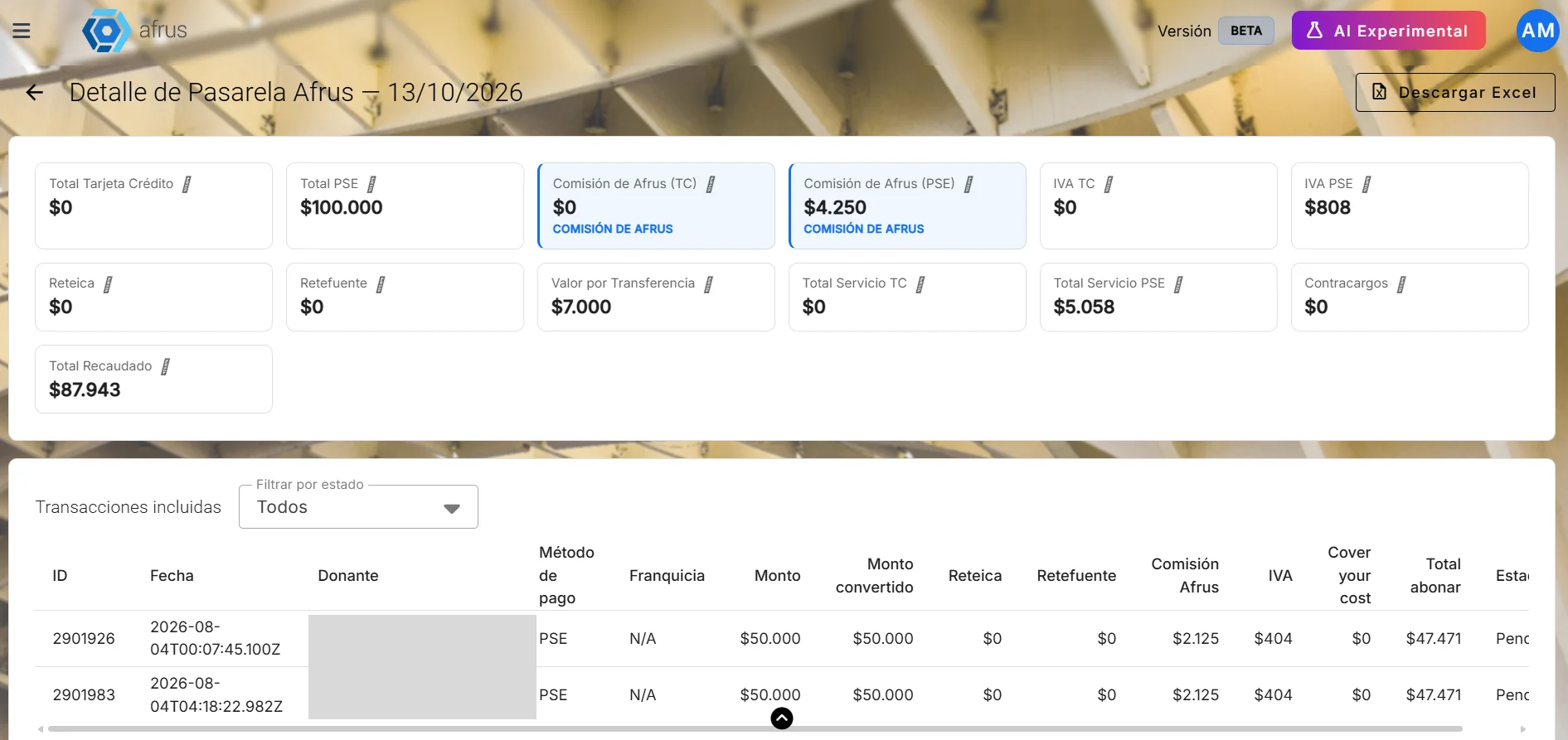
In short: Total raised − Gateway fee − bank withholdings − transfer cost = what reaches your account.
How to see and download the donations in each payout
Review the detail. Besides the summary, the section shows the same data for each donation included in the transfer.
Download the detail. Click "Descargar" (Download). The file has more information than you see on screen, for example the campaign of each donation. It is the one to send to your accounting team.
Frequently asked questions
Why don't I see Pasarela AFRUS in my menu?
Only organizations that use the AFRUS gateway see it. If your organization charges with another gateway (set up in Configuración > Pagos > Pasarelas de pago), you won't see this section.
Why did I receive less than my donors gave?
Because the gateway fee, the bank withholdings and the transfer cost are deducted from each payout. In the payout detail you see each deduction.
Does AFRUS charge me the ICA and source withholdings?
No. The bank applies them when the donor pays by card. AFRUS only shows you how much was deducted.
Can AFRUS change the bank withholdings?
No. The bank sets the withholdings. If your organization is not subject to a withholding, you need to handle it with the bank.
Can what I owe AFRUS for the platform be deducted from my payouts?
No. They are two separate charges: the payment gateway on one side and the use of the platform on the other.
Do my monthly donations also appear?
Yes, every charge that goes through the AFRUS gateway is included in the payout that corresponds to its date.
I have questions about my rate or a deduction. Who do I ask?
Write to us with the payout date and we'll explain each amount.
Last updated: 2026-10-28
Need help? Talk to the afrus team
In this article
✕
Related Tutorials

Pasarela AFRUS
October 28, 2026
What Pasarela AFRUS is for
Learn what Pasarela AFRUS is for: knowing how much you received, when, and what was deducted from each transfer.
afrus.ai
Pasarela AFRUS
October 28, 2026
What Pasarela AFRUS is
Learn what Pasarela AFRUS is: the section where you see every transfer AFRUS makes to your organization with your donations.
afrus.ai
Pasarela AFRUS
October 28, 2026
How to read a payout
Learn how to read a Pasarela AFRUS payout: dates, total raised, gateway fee, withholdings and what reaches your account.
afrus.ai
Pasarela AFRUS
October 28, 2026
How Pasarela AFRUS is set up
Learn how to start using Pasarela AFRUS. You don't need to set anything up: it appears on its own if you use the AFRUS gateway.
afrus.ai