🡠 Back


Logs de interacciones guide
Reading time
4 min
Trackers
October 28, 2026
afrus.ai
Complete guide to Logs de interacciones: every step with its screenshots and the frequently asked questions.
In this article
With this guide you will be able to check whether an email or a WhatsApp message was sent to a person from AFRUS, see what was sent and send it again if it failed.
Module: Trackers · Menu: Trackers > Logs de interacciones (Interaction logs) · Audience: communications and donor care teams
About the labels in this guide: buttons, fields and menus are written exactly as they appear in the Spanish version of the console, with an English explanation where it helps.
What Logs de interacciones is
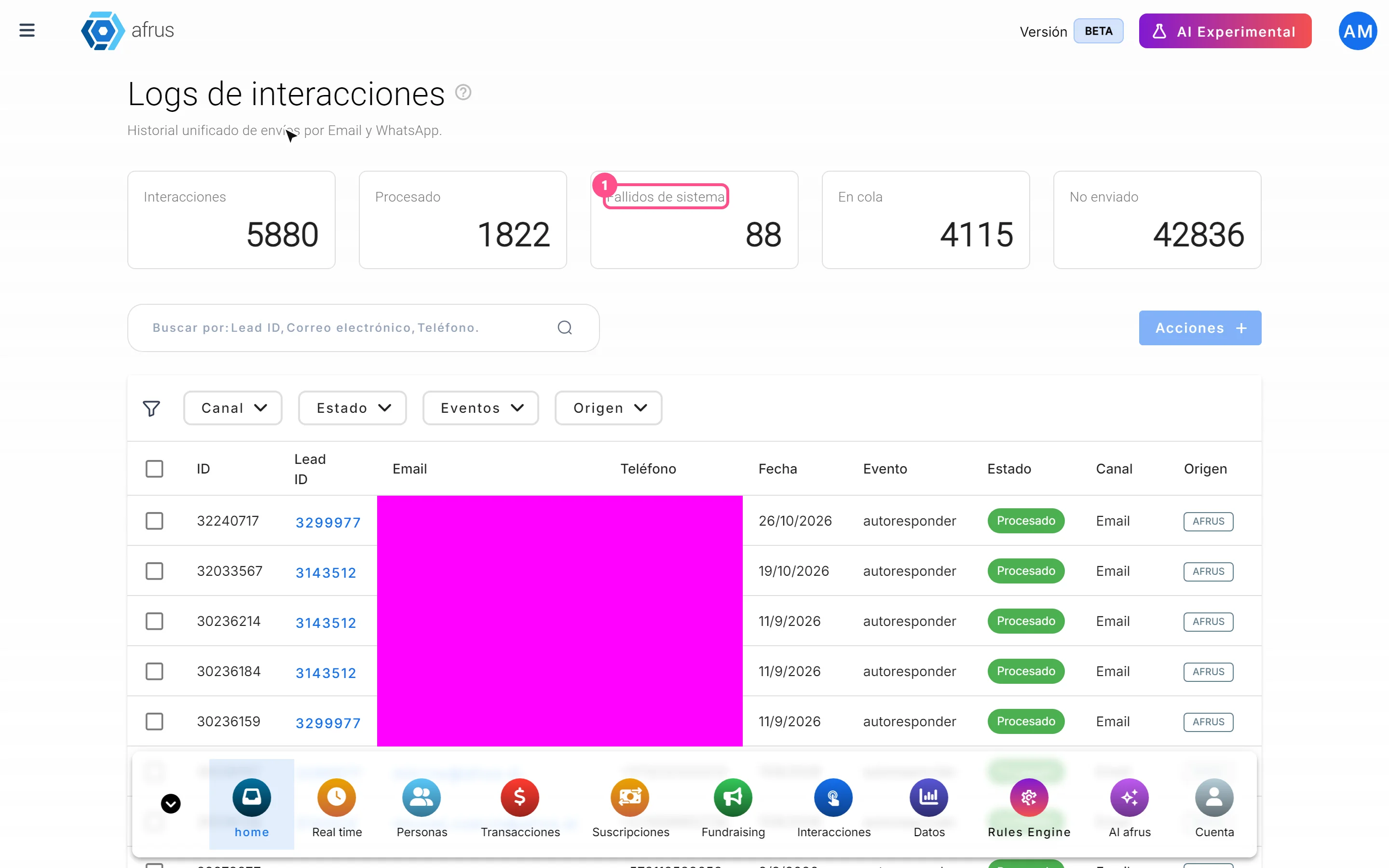
It is the history of every email and every WhatsApp message AFRUS prepared for a person, with its sending status.
Every time AFRUS prepares a message for someone (for example, an automatic thank-you email or a mass send), it adds a row to this list. There you see who it was for, how it went out and whether it was sent correctly.
What it is for
- Answering a donor who says they didn't get an email. You search for their email and see whether it was sent, when and from where.
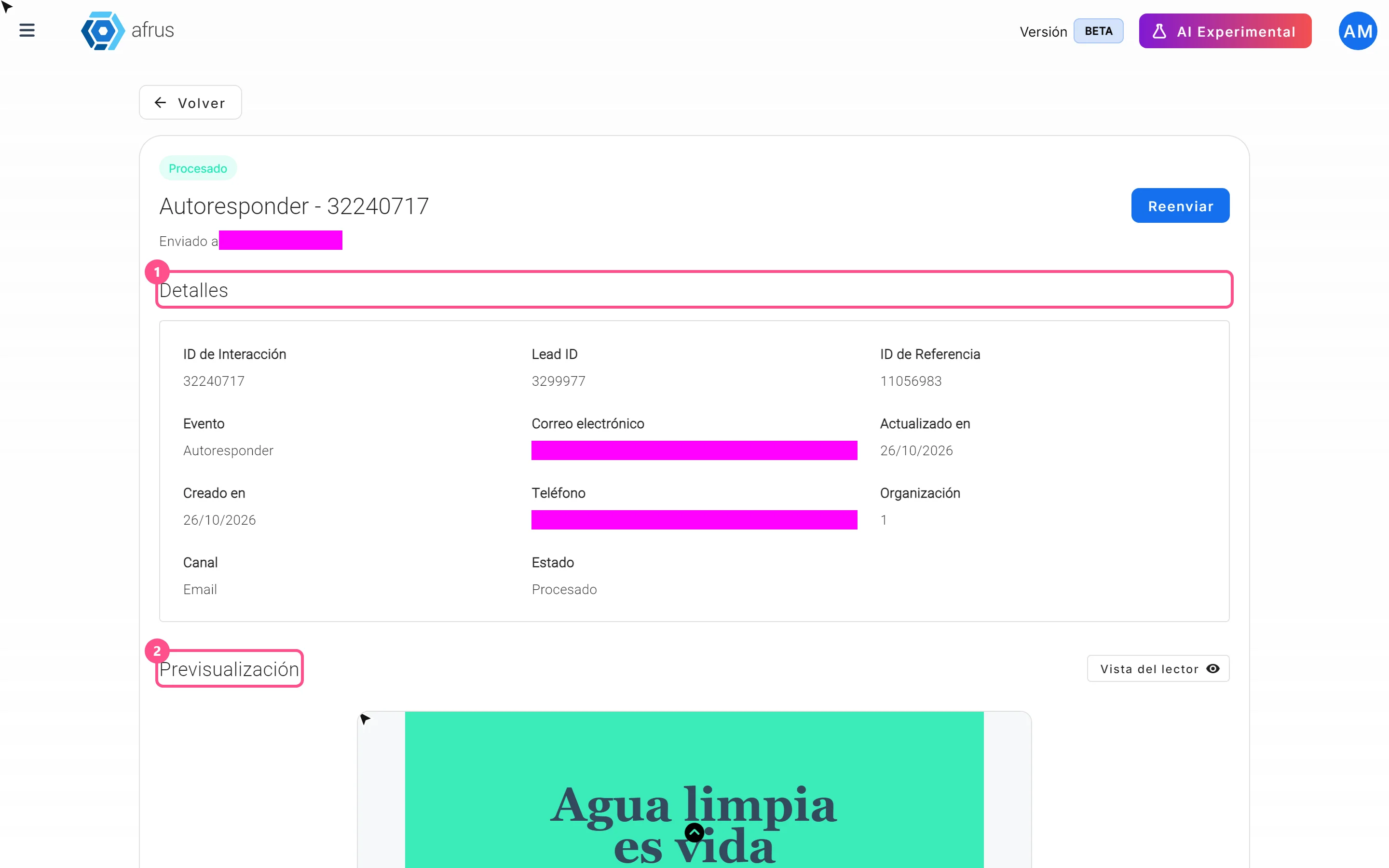
- Seeing what was sent. You can open the preview of the message as it went out.
- Finding sends with errors and sending them again.
Step by step
What information you find there and how to read it
Part 1 — Find the person
Open the screen. Go to Trackers > Logs de interacciones.
Search for the person. In the search box choose Lead ID, Correo electrónico (email) or Teléfono (phone) and type the full, exact value. If you type only part of it, it won't be found.
Filter if you need to. You can filter by Canal (Channel: Email or WhatsApp), by Estado (Status), by Eventos (where the message came from) and by Origen (Origin). Choose only one option per filter (see Limitations).
Read the Estado column. It tells you what happened to the message (see the table below).
Look at the message. Click "Ver detalle" (View detail) to see the exact date and time and the preview of the email or WhatsApp message.
What each status means:
| Status | What it means |
|---|---|
| Procesado (Processed) | AFRUS handed the message to the email or WhatsApp service without errors. It does not confirm it reached the inbox or was read |
| En cola (Queued) | The message is waiting its turn to go out |
| Fallido (Failed) | There was an error sending it |
| No enviado (Not sent) | AFRUS decided not to send it, for example because the person can't be contacted on that channel or because the mass send was stopped |
Important: No enviado rows don't appear when you open the screen. To see them, filter Estado by No enviado.
If no row appears, AFRUS didn't prepare any message for that person.
Want to know whether the email was opened or bounced? This screen doesn't say. Check the Eventos (Events) tab in the person's profile or the detail of the mass send.
Where the message came from (Evento column):
| Event | Shown in the detail as | What it is |
|---|---|---|
autoresponder |
Autoresponder | An automatic email, like a thank-you |
blast |
Blast | A mass email or WhatsApp send |
api |
Mensaje personalizado (Personalized message) | A message written by the AI agent (its Origen is Alma) |
custom |
WhatsApp personalizado (Personalized WhatsApp) | A WhatsApp message sent to one person from a connected line |
The cards at the top:
- Interacciones (Interactions) counts the rows you see with your search and filters.
- Procesado, Fallidos de sistema (System failures), En cola and No enviado count your organization's whole history, without filters. That's why they don't add up to Interacciones.
Part 2 — Resend a message that failed
Choose the message. From the list, check one or more rows with status Fallido and click "Acciones" (Actions) > "Reenviar" (Resend). From the detail, click "Reenviar".
Check. You will see "Comunicación reenviada correctamente" (Message resent successfully) and the row moves to En cola. AFRUS sends exactly the same message again.
Can it be undone? No. Once resent, the message goes out again. Only resend Fallido messages: if you resend a Procesado one, the person receives it twice. En cola messages can't be resent.
Frequently asked questions
Does "Procesado" mean the person received the email?
No. It means AFRUS handed it to the sending service without errors. To know whether it arrived, was opened or bounced, check the Eventos tab in the person's profile.
How long does a message take to go from "En cola" to "Procesado"?
There is no fixed time; it depends on how many messages are waiting.
Last updated: 2026-10-27
Need help? Talk to the afrus team
In this article
✕
Related Tutorials
Trackers
October 28, 2026
Monitor de interacciones guide
Complete guide to Monitor de interacciones: every step with its screenshots and the frequently asked questions.
afrus.ai

Trackers
October 28, 2026
Procesos en ejecucion guide
Complete guide to Procesos en ejecucion: every step with its screenshots and the frequently asked questions.
afrus.ai
Trackers
October 28, 2026
Logs de analytics guide
Complete guide to Logs de analytics: every step with its screenshots and the frequently asked questions.
afrus.ai
Trackers
October 27, 2026
What Logs de interacciones is
Learn what Logs de interacciones is: the history of every email and WhatsApp message AFRUS prepared for a person.
afrus.ai