🡠 Back


Logs de analytics guide
Reading time
4 min
Trackers
October 28, 2026
afrus.ai
Complete guide to Logs de analytics: every step with its screenshots and the frequently asked questions.
In this article
With this guide you will be able to check that your donation forms are notifying Google Analytics 4, Meta (Facebook) or Google Tag Manager every time someone starts or completes a donation.
Module: Trackers · Menu: Trackers > Logs de analytics (Analytics logs) · Audience: digital marketing and paid media teams
About the labels in this guide: buttons, fields and menus are written exactly as they appear in the Spanish version of the console, with an English explanation where it helps.
What Logs de analytics is
It is the record of every notice your donation forms sent to Google Analytics 4, Meta or Google Tag Manager.
If one of those tools is connected to a form (widget), every time a person opens the form, moves forward a step or completes their donation, AFRUS notifies that tool. Each notice is called an event. This screen shows each event, what was sent and what the tool answered.
If your form has none of those tools set up, nothing is sent and this screen stays empty.
What it is for
- Checking that your tracking works. You see whether your forms' events are going out to Google or Meta.
- Finding setup errors. For example, if the form is missing its Google or Meta connection details.
- Reviewing one person's events. Useful for checking a test donation.
Step by step
What information you find there and how to read it
Make a test donation in your form, or wait for real donations.
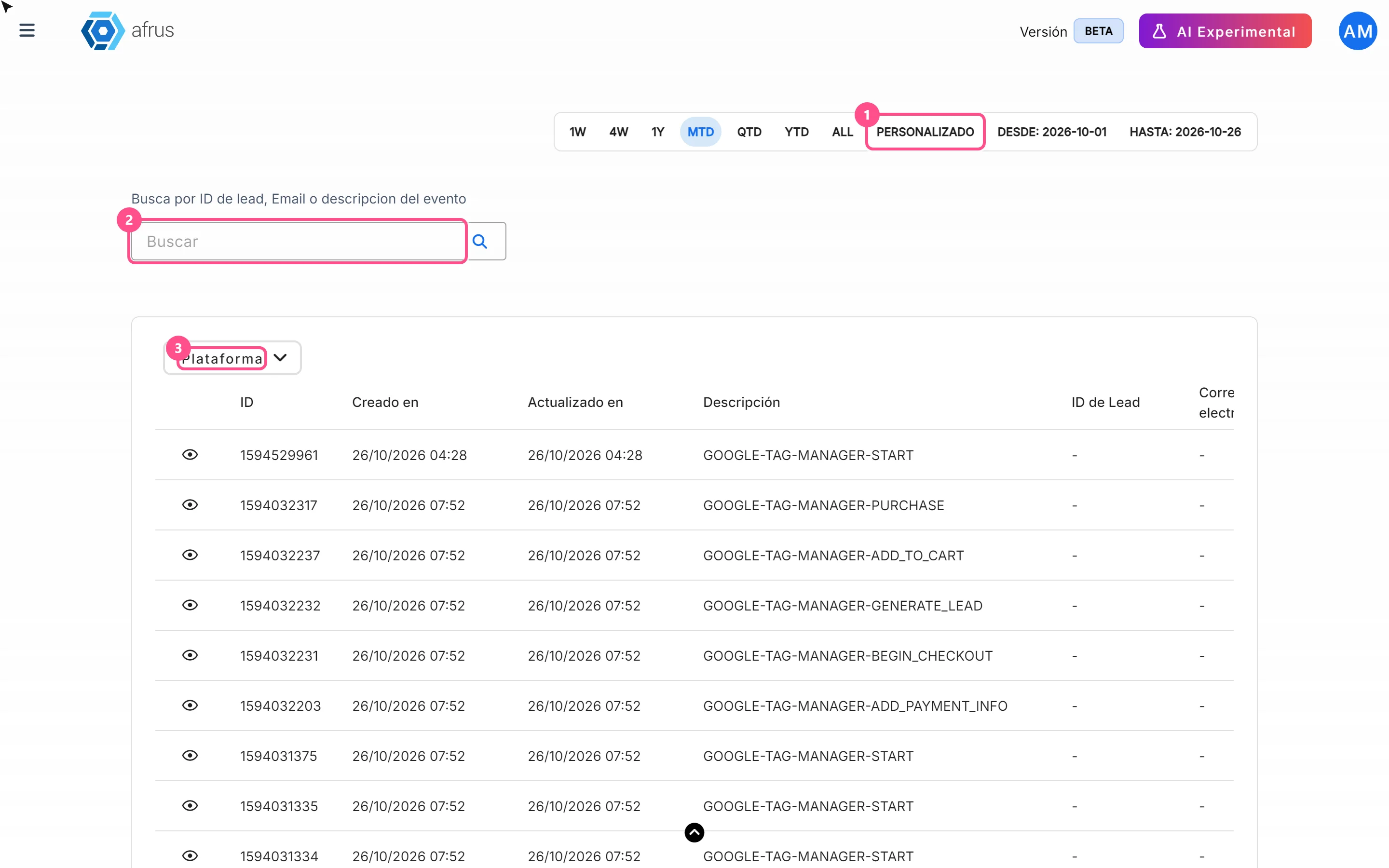
Open the screen. Go to Trackers > Logs de analytics and choose a date range that includes your test. It opens on the current month.
Search for the person. Type their email or ID in the search box and click the magnifying glass. Pressing Enter doesn't search.
Read the Descripción (Description) column. It tells you which tool the event was sent to and which event it was:
GOOGLE-…is Google Analytics 4.FACEBOOK-…is Meta.GOOGLE-TAG-MANAGER-…is Google Tag Manager.
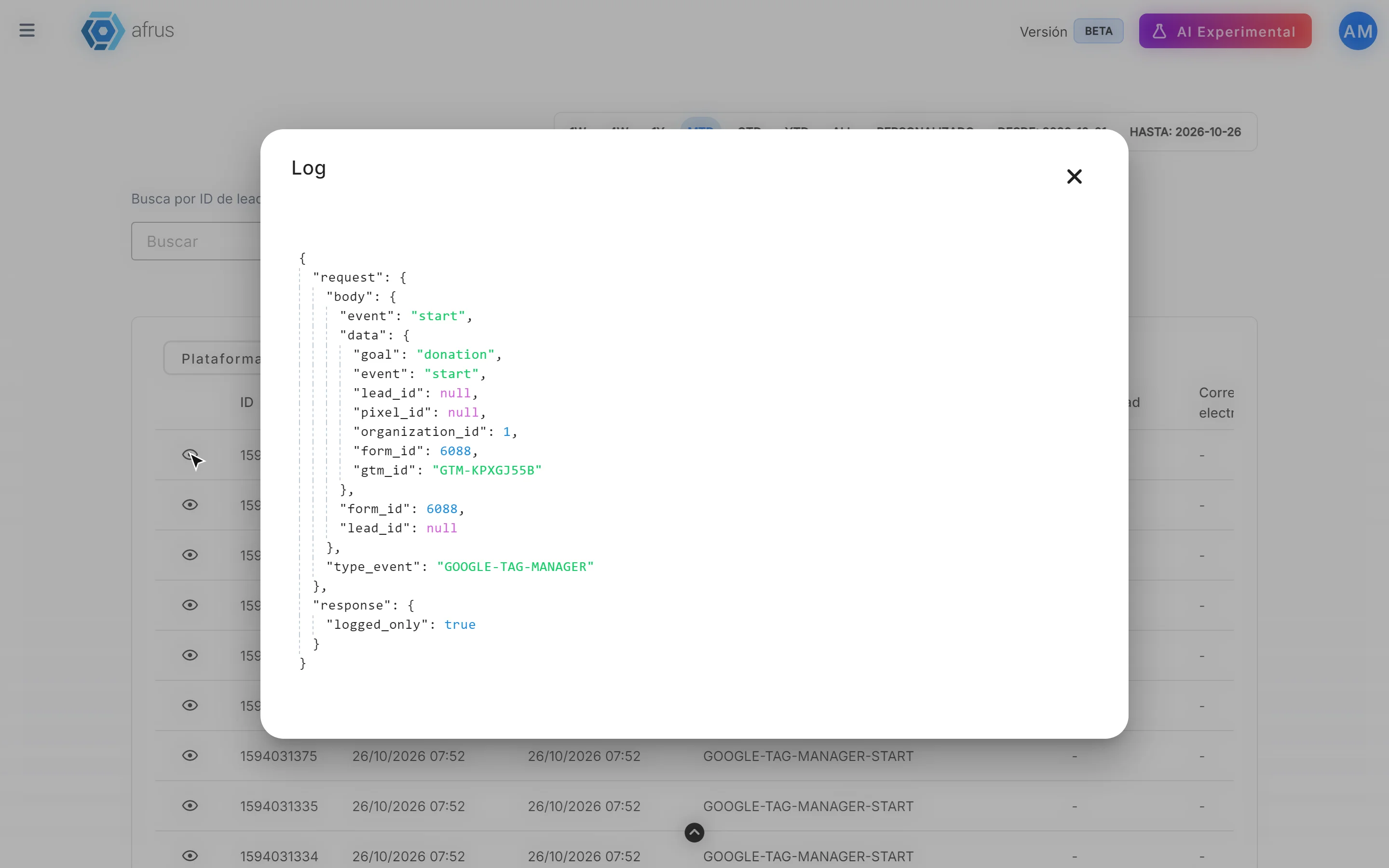
Open the detail. Click the eye icon on the row. The Log window shows what was sent and what the tool answered.
Which event is which (the last part of the Descripción):
| Ends in | What happened in the form |
|---|---|
START |
The form was opened |
ADD_TO_CART, BEGIN_CHECKOUT, ADD_PAYMENT_INFO, GENERATE_LEAD |
The person moved forward a step with the continue button |
PURCHASE |
The payment was confirmed |
REGISTER |
The person signed up in a registration form |
How to read the answer in the Log window:
- Meta: if it worked, you'll see what Meta returned. If it failed, you'll see
success: falseand a message with the reason, for example that the form is missing the Pixel details. - Google Analytics 4: if you see
missing_ga_credentials, the form is missing its GA4 connection details and the event was not sent. If you seesuccess: false, Google answered with an error. If there's no error, Google received the notice; to confirm it recorded it, check GA4's real-time report. - Google Tag Manager: it's normal to see
logged_only: true. AFRUS only notes the event here; Tag Manager receives it directly from the person's browser.
If you have Meta conversions from AFRUS turned on, you'll also see FACEBOOK-… rows created by AFRUS after each payment.
Learn more about analytics tracking
To understand in depth how AFRUS records your donors' actions and how to set up your analytics tools, check these tutorials:
- How does AFRUS record your donors' actions? (Part 1 of 3)
- GTM, setup and deduplication (Part 2 of 3)
- Benefits, verification and FAQ (Part 3 of 3)
Frequently asked questions
I don't see any rows for my form. What's wrong?
Most likely the form doesn't have Google Analytics 4, the Meta Pixel or Google Tag Manager set up. Without that setup nothing is sent.
Last updated: 2026-10-27
Need help? Talk to the afrus team
In this article
✕
Related Tutorials
Trackers
October 28, 2026
Logs de interacciones guide
Complete guide to Logs de interacciones: every step with its screenshots and the frequently asked questions.
afrus.ai
Trackers
October 28, 2026
Monitor de interacciones guide
Complete guide to Monitor de interacciones: every step with its screenshots and the frequently asked questions.
afrus.ai

Trackers
October 28, 2026
Procesos en ejecucion guide
Complete guide to Procesos en ejecucion: every step with its screenshots and the frequently asked questions.
afrus.ai
Trackers
October 27, 2026
What Logs de interacciones is
Learn what Logs de interacciones is: the history of every email and WhatsApp message AFRUS prepared for a person.
afrus.ai