🡠 Back


Monitor de interacciones guide
Reading time
4 min
Trackers
October 28, 2026
afrus.ai
Complete guide to Monitor de interacciones: every step with its screenshots and the frequently asked questions.
In this article
With this guide you will know whether your organization can keep sending mass emails without risk of being blocked, and which send is causing problems.
Module: Trackers · Menu: Trackers > Monitor de interacciones (Interaction monitor) · Audience: communications and email marketing teams
About the labels in this guide: buttons, fields and menus are written exactly as they appear in the Spanish version of the console, with an English explanation where it helps.
What Monitor de interacciones is
It is a dashboard that shows the health of your mass emails (blasts). It tells you how many emails you sent, how many bounced, how many were marked as spam and whether your sending account is at risk.
An email bounces when it doesn't reach its destination, for example because the address doesn't exist. A complaint is when the person marks your email as spam. If there are too many bounces or complaints, AFRUS may limit or block your sends.
This dashboard only counts mass emails. It doesn't include automatic emails (autoresponders), transaction emails or WhatsApp messages.
What it is for
- Knowing whether you can keep sending. You see whether your account is active, on alert or blocked.
- Keeping your bounce and complaint rates healthy. You compare your numbers with AFRUS's limits.
- Finding the send that caused problems. So you know which list to clean.
Step by step
What information you find there and how to read it
Part 1 — Check your account status
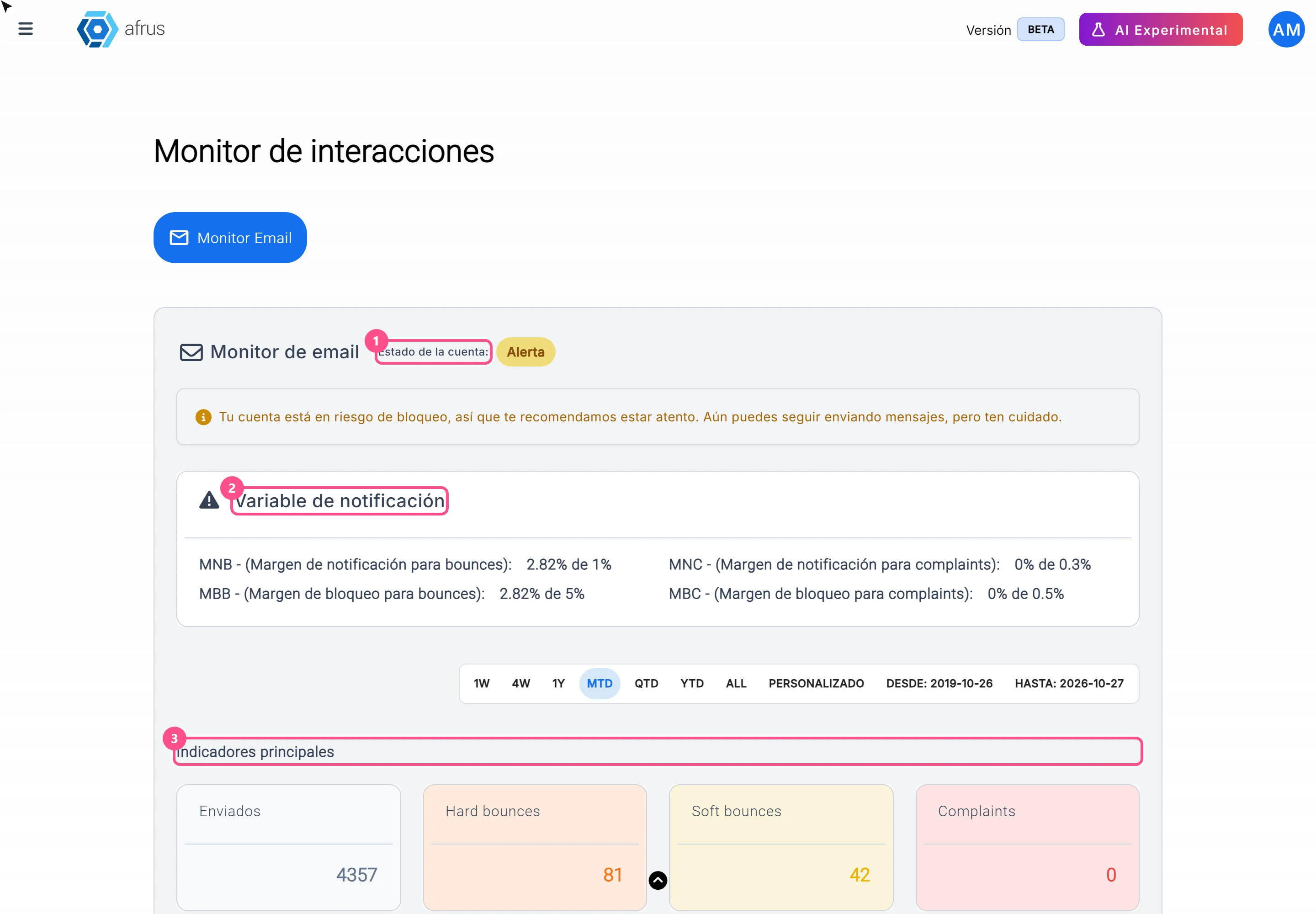
Open the monitor. Go to Trackers > Monitor de interacciones. The Monitor Email tab opens.
Look at the Estado de la cuenta (Account status). You'll see one of these labels:
| Label | What it means | What to do |
|---|---|---|
| Activa (Active) | You can send without problems | Nothing |
| Alerta (Alert) | Your bounces or complaints passed the first limit. You can still send, but your account is at risk of being blocked | Clean your lists before the next send |
| Bloqueada (Blocked) | Your bounces or complaints passed the blocking limit, or AFRUS blocked the account. You can't send | Write to support at support@afrus.app |
| Envío limitado (Limited sending) | The account was blocked, but AFRUS enabled a number of sends for you | Clean your lists and send only to groups smaller than your available sends |
Important: if AFRUS blocked your account, it stays Bloqueada even if your numbers improve. To unblock it, write to support.
With Envío limitado, a campaign with more recipients than available sends won't be sent.
Part 2 — Compare your rates with the limits
Check the Variable de notificación (Notification variables). It shows four lines, each with your current rate against the limit ("X% de Y%"):
- MNB and MBB: your bounce rate against the alert limit and the blocking limit.
- MNC and MBC: your complaint rate against the alert limit and the blocking limit.
The bounce rate adds hard and soft bounces together.
Check the Indicadores principales (Main indicators). Enviados (Sent), Hard bounces, Soft bounces and Complaints. These numbers count your whole history of mass emails.
The limits only apply from 1,000 emails sent. If you have fewer, you'll see: "El bloqueo de la cuenta solo se aplicará cuando se superen los 1000 envíos." (The account will only be blocked after more than 1,000 sends.)
Part 3 — Find the send that's causing bounces
Choose the dates. Use the date bar to see the sends from a period. It opens on all dates. The dates only change the sends table; the account status and indicators always use the whole history.
Check the Lista de blast (Blast list). Look at Bounce Rate (%) and Complaint Rate (%) for each send. The colors help:
- Green: below the alert limit.
- Yellow: between the alert limit and the blocking limit.
- Red: at the blocking limit or above.
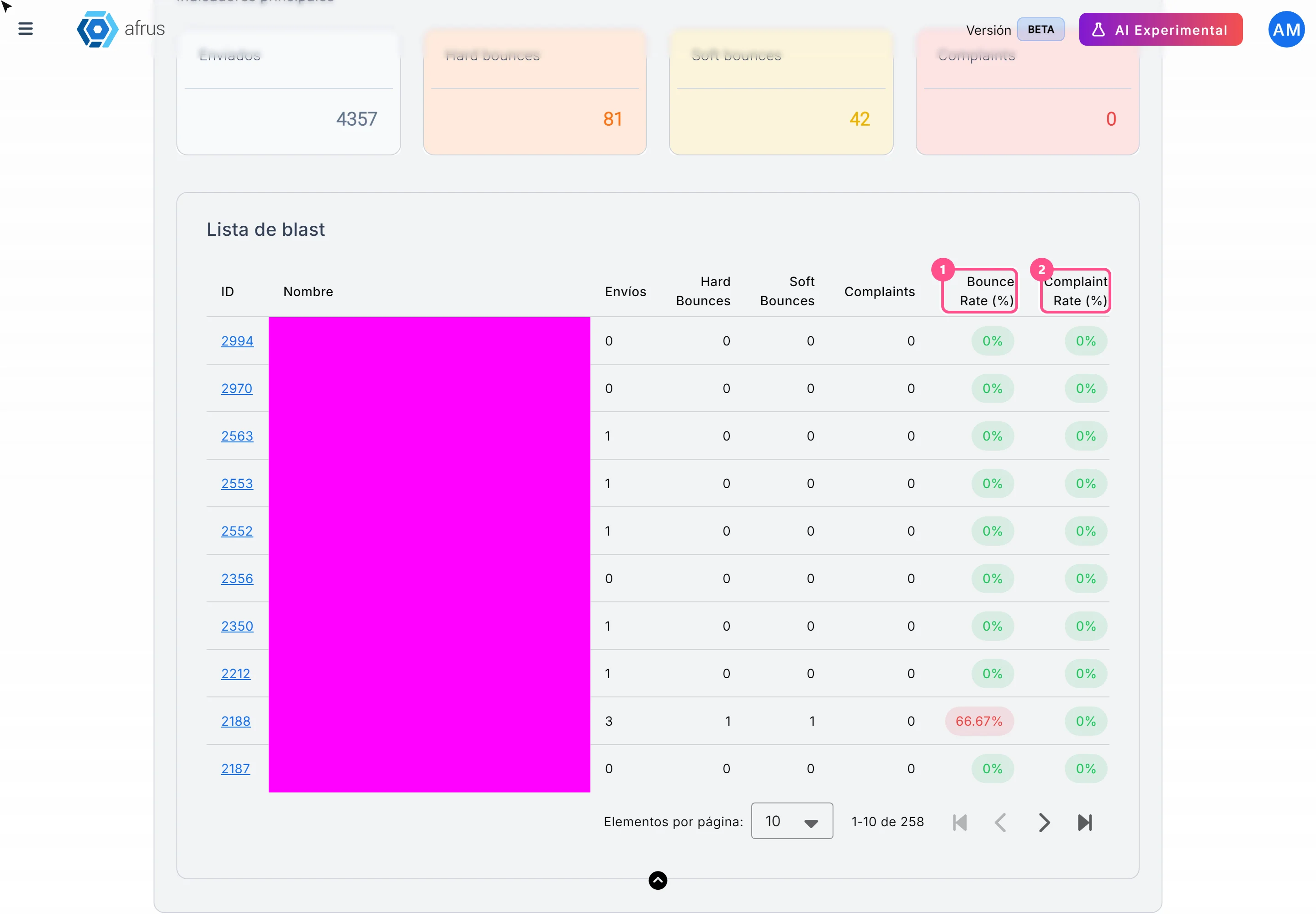
Open the send. Click its ID to see the detail. The table shows 5 sends per page; you can change it to 10, 25 or 50.
Frequently asked questions
My account is on Alerta. Can I send?
Yes, but you are at risk of being blocked. Before the next send, remove invalid or very old emails from your lists.
What are AFRUS's limits?
You can see them in the Variable de notificación section, next to your current rate. They are the same for every organization.
Last updated: 2026-10-27
Need help? Talk to the afrus team
In this article
✕
Related Tutorials
Trackers
October 28, 2026
Logs de interacciones guide
Complete guide to Logs de interacciones: every step with its screenshots and the frequently asked questions.
afrus.ai

Trackers
October 28, 2026
Procesos en ejecucion guide
Complete guide to Procesos en ejecucion: every step with its screenshots and the frequently asked questions.
afrus.ai
Trackers
October 28, 2026
Logs de analytics guide
Complete guide to Logs de analytics: every step with its screenshots and the frequently asked questions.
afrus.ai
Trackers
October 27, 2026
What Logs de interacciones is
Learn what Logs de interacciones is: the history of every email and WhatsApp message AFRUS prepared for a person.
afrus.ai